
Carburettor (Pierburg 2V type) - fast idle speed adjustment
1 Check the idle speed and mixture adjustment. The idle speed must be correct before attempting to check or adjust the fast idle speed.
2 With the engine at normal operating temperature, and a tachometer connected in accordance with the manufacturer’s instructions proceed as follows.
3 Remove the air cleaner.
4 Position the fast idle speed adjustment screw on the lowest (6th) step of the fast idle cam (see illustration).
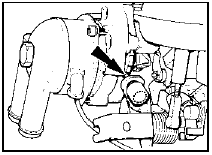
21.4 Fast idle speed adjustment - Pierburg 2V
carburettor
Screw (arrowed) should rest on lowest (6th) step of cam
5 Check that the fast idle speed is as specified. If adjustment is required, stop the engine and proceed as follows.
6 Remove the tamperproof cap from the fast idle speed adjustment screw.
7 Ensure that the adjustment screw is still resting on the lowest step of the fast idle cam, then open the throttle so that a small screwdriver can be used to adjust the screw from below the carburettor.
8 Start the engine and recheck the fast idle speed.
9 If necessary, repeat the procedure given in paragraphs 7 and 8 until the correct fast idle speed is obtained.
10 On completion of adjustment, stop the engine and disconnect the tachometer, then refit the tamperproof cap to the adjustment screw, and refit the air cleaner.
See also:
Handbrake lever - removal and refitting
Removal
1 Chock the front wheels, raise and support
the vehicle at the rear using stands (see
“Jacking and Vehicle Support”) then release
the handbrake.
2 Working underneath, extract the spring c ...
Minor body damage - repair
Repair of minor scratches in
bodywork
If the scratch is very superficial, and does not
penetrate to the metal of the bodywork, repair is
very simple. Lightly rub the area of the scratch
with a pa ...
Rear suspension lower arm (Saloon, Hatchback and Estate models) - removal
and refitting
Models with rear drum brakes
Removal
1 Chock the front wheels, jack up the rear of
the vehicle and support on axle stands placed
under the side members.
2 Remove the relevant driveshaft.
3 Remov ...
