
Fuel pump - cleaning
Note: Refer to the warning at the end of Section 1 before proceeding.
1 On certain early models the fuel pump has a detachable cover allowing access to the internal filter for cleaning. If this type of pump is fitted (identified by a raised cover secured with a screw) the filter can be cleaned as follows.
2 Place a piece of rag around the pump body to catch the fuel which will drain out when the cover is removed.
3 Unscrew and remove the single cover screw and lift off the cover (see illustration).
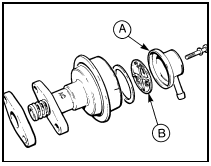
4.3 CVH engine fuel pump filter components
A Pump cover B Filter
4 Take out the rubber sealing ring and the filter screen from inside the cover.
5 Clean the screen by brushing it in clean fuel, then fit it into the cover, noting the projections on some screens which centralise it.
6 Fit the sealing ring. If it is not in good order, renew it.
7 Locate the cover on the pump body. On some pumps, the cover is correctly installed when the notch in the cover engages in the groove in the pump body.
8 Screw in the retaining screw, but do not overtighten it provided it is making a good seal.
See also:
Ignition HT coil - testing, removal and refitting
Note: Refer to the precautions given in
Section 1 before proceeding.
All except models with DIS
ignition system
Testing
1 Accurate checking of the coil output
requires the use of special test eq ...
Exhaust gas oxygen (HEGO) sensor (2.0 litre DOHC/1.6 & 1.8 litre (R6A type)
CVH) - removal and refitting
Note: Do not touch the tip of the HEGO
sensor as this will drastically shorten its
service life.
Note: A new sealing ring should be used on
refitting.
Removal
1 Ensure that the engine and the ex ...
Diagram 2a: 1986-on Lighting all models
Diagram 2a: 1986-on Lighting all models ...
