
Fuel pressure regulator - removal and refitting
Removal
1 Remove the CFI unit as described in Section 8.
2 Remove the four screws securing the regulator housing to the CFI unit, then carefully lift off the housing and recover the ball, cup, large spring, diaphragm, valve, and small spring, noting the position and orientation of all components (see illustration).
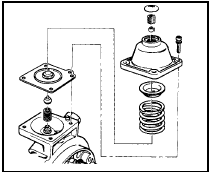
9.2 Exploded view of fuel pressure regulator - 1.4 CFI engine
Do not attempt to prise the plug from the regulator housing, or adjust the Allen screw (if no plug is fitted); this will alter the fuel system pressure.
3 Examine all components and renew any
defective items as necessary
Refitting
4 Commence reassembly by supporting the
CFI unit on its side so that the regulator
components can be fitted from above.
5 Fit the small spring, valve, diaphragm (ensuring that it locates correctly), large spring, and the spring cup.
6 Carefully place the ball into position on the spring cup, and ensure that it locates correctly.
7 Refit the regulator housing, taking great care to avoid disturbing the ball, and once correctly in position, tighten the screws evenly to avoid distorting the diaphragm.
8 Refit the CFI unit as described in Section 8.
9 On completion, the fuel system pressure should be checked by a Ford dealer at the earliest opportunity.
See also:
Engine oil and filter renewal (Every 6000 miles or 6 months)
1 Frequent oil and filter changes are the most
important preventative maintenance
procedures that can be undertaken by the DIY
owner. As engine oil ages, it becomes diluted
and contaminated, which ...
Cigar lighter - removal and refitting
Removal
1 Disconnect the battery negative terminal.
2 On pre-1986 models remove the ashtray
then undo the screws and withdraw the
ashtray housing. On 1986 models onwards,
refer to Section 21 and ...
Wheel sensor (ABS) - removal and refitting
Note: A new O-ring must be used when
refitting a sensor.
Front wheel sensor
1 Apply the handbrake, loosen the relevant
front roadwheel nuts, then jack up the front of
the vehicle and support on a ...
