
Fuel computer components - removal and refitting
Computer unit
Removal
1 Disconnect the battery negative terminal.
2 Undo the two instrument panel bezel retaining screws and ease the bezel out to release the lower clips.
3 Withdraw the computer module from the facia to the right of the instrument panel.
4 Disconnect the wiring multi-plug and remove the computer.
Refitting
5 Refitting is a reversal of removal.
Speed sender unit
Removal
6 Undo the retaining nut and detach the
speedometer cable from the speed sender
unit (see illustration).
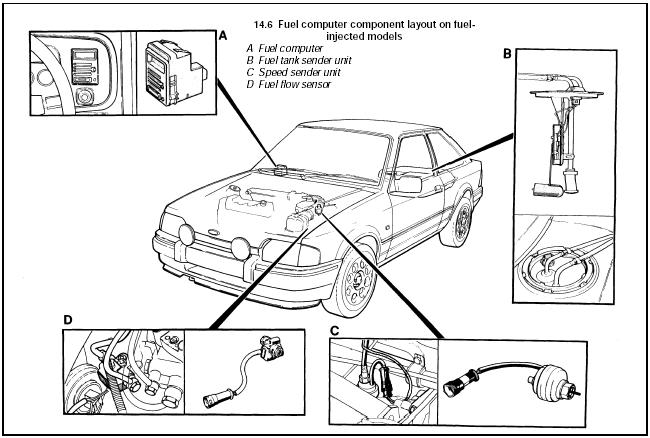
14.6 Fuel computer component layout on fuelinjected models
A Fuel computer
B Fuel tank sender unit
C Speed sender unit
D Fuel flow sensor
7 Unclip and disconnect the wiring multi-plug.
8 Undo the retaining nut and withdraw the speed sender unit from the transmission.
Refitting
9 Refitting is a reversal of removal.
Fuel flow sensor
Removal
10 The fuel flow sensor is used in conjunction
with the fuel computer on fuel-injected models
and is located on the fuel distributor at the front
left-hand side of the engine compartment.
11 Disconnect the wiring multi-plug then undo the two banjo unions on the side of the unit. Note the position of the sealing washers.
12 Undo the two retaining screws and remove the fuel flow sensor.
Refitting
13 Refitting is the reverse sequence to
removal. Ensure that the sealing washers are
correctly fitted.
See also:
Door mirror - removal and refitting
Manually-operated mirror
1 On remote-control type mirrors, unscrew
the bezel from the adjuster knob (see
illustration).
29.1 Unscrew the bezel from the adjuster knob . . .
2 Prise the mirror tr ...
Examination and renovation
Crankshaft, bearings, cylinder
bores and pistons
1 Refer to Section 13 in Part A of this Chapter.
The information applies equally to the CVH
engine, except that standard sized crankshafts
are unm ...
Pistons and connecting rods - removal and refitting
Note: New connecting rod bolts and a new oil
pick-up pipe gasket must be used on refitting.
Removal
1 Remove the sump and the cylinder head.
2 Unscrew the two securing bolts, and
remove the oil p ...
