
Air cleaner - removal and refitting
K-Jetronic system
Removal
1 Remove the air cleaner element as
described in Chapter 1.
2 Detach the fuel filter from the side of the cleaner casing (leave the fuel lines attached to the filter) and the air inlet hose from the front end of the case.
3 Unscrew and remove the casing retaining nuts from the inner wing panel and lift out the casing.
Refitting
4 Refitting is the reversal of the removal
procedure. Refit the air cleaner element as
described in Chapter 1.
KE-Jetronic system
Removal
5 Undo the two bolts securing the air cleaner
assembly to the air sensor plate unit and
remove the air cleaner assembly (see
illustration).
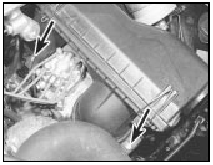
2.5 KE-Jetronic air cleaner retaining bolts (arrowed)
Refitting 6 Refit the unit to the air sensor plate and secure with the two bolts.
See also:
Alternator drivebelt check (Every 6000 miles or 6 months)
1 A conventional vee drivebelt is used to
drive both the alternators and water pump
pulleys on OHV and HCS engines, and the
alternator pulley only on CVH engines, power
being transmitted via a pul ...
Front suspension crossmember - removal and refitting
Removal
1 Remove the steering gear.
2 Support the engine with a jack and
interposed block of wood under the sump.
3 Unscrew and remove the engine mounting
nuts from the top of the mountings in th ...
Throttle cable - adjustment, removal and refitting
The procedure is similar to that described in
Part A of this Chapter for carburettor engines. ...
